The most useful website report ends with a decision someone can carry out. It names the problem, explains why it deserves attention, and says how the team will check the result. A page full of warnings can leave all three unanswered.
For an agency owner, that gap has a cost. Someone must reopen the tools, work out which warnings belong together, explain the issue to a client, and turn it into a task. Next month, they may repeat the investigation because nobody recorded what changed.
The answer is not simply to add AI summaries. The work needs a structure that carries evidence into a decision and keeps the decision attached to its outcome.
1. Start with the task the website must support
Before ranking technical issues or content ideas, write down the task that matters. For a local service business, it might be requesting an appointment. For a software business, it might be understanding a plan and starting an appropriate trial. A publisher may care about finding an answer and returning later.
This changes the meaning of a warning. A broken link to an obsolete announcement and a broken link to the booking form are both broken links. They do not deserve the same position in the queue.
Ask the owner which pages and journeys support the current business goal. Record constraints too: an unavailable service, a full appointment book, or an offer that should not attract more enquiries. Without that context, “more traffic” can become a recommendation nobody wants.
2. Make sure the evidence can answer the question
Two numbers can look comparable while describing different things. Cloudflare documents that its request analytics can include crawlers and threats. A request total therefore cannot stand in for a count of potential customers. Cloudflare's metric definitions explain the distinction.
Similarly, a detailed Search Console export is not necessarily a complete list of every query. Google documents data loss when requesting certain detailed combinations. Its export guidance is a useful boundary for any diagnosis based on those rows.
For each proposed decision, record the source, date range, affected pages, device or audience, and known gaps. “We have no usable conversion data” is valuable information. It stops a report from presenting an unsupported revenue estimate as a fact.
Coverage checks should be brief and close to the evidence. The operator needs to understand whether the comparison is usable, without reading an infrastructure manual.
3. Combine symptoms into a working problem
Demonstration: a fictional agency manages a service website. Its reports show fewer enquiries, repeated clicks around the mobile submit button, and errors from the form endpoint after a deployment.
Those are three observations. They may describe one problem. The next step is to reproduce the form journey, including whether a valid enquiry reaches its destination. Opening three unrelated tickets would make the team repeat the same work.
If the failure is reproducible, the decision can be concrete: repair the mobile enquiry flow, assign the developer, verify a test submission, and watch valid delivered enquiries afterward. The report should still avoid claiming how much revenue was lost. That would require additional evidence.
If the form works, the observations remain useful leads. They do not become proof of a different cause just because the first explanation failed. The right outcome may be a narrower investigation.
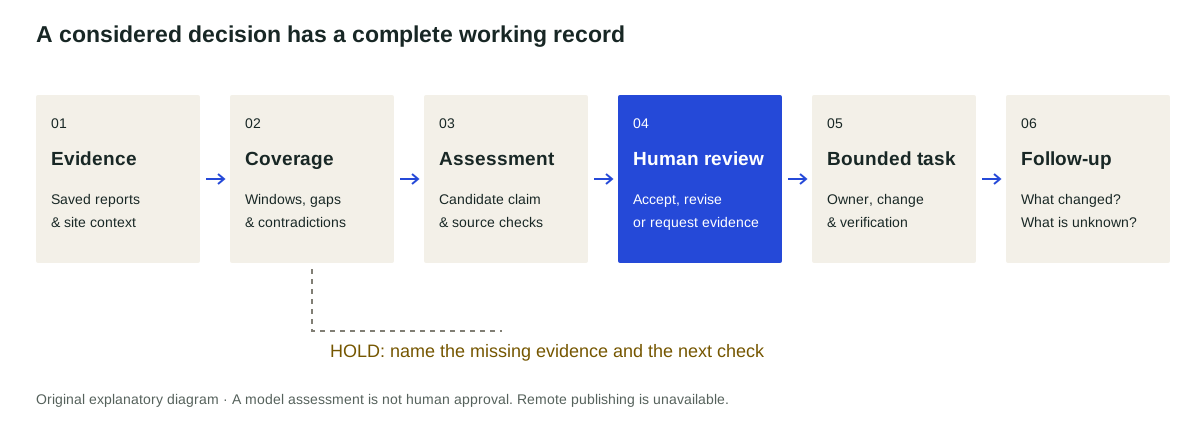
4. Choose an action with an explicit reason
Useful prioritization already exists in established products. Sitebulb offers prioritized technical hints, and SEOTesting asks “Did that SEO change work?” Sitebulb and SEOTesting are reminders to assess your existing workflow before buying another layer.
Whatever tools you use, a working priority should explain four things:
- Business relevance: which useful customer task is affected?
- Evidence strength: what has been observed or reproduced?
- Feasible action: what can the responsible person actually change?
- Time sensitivity: what happens if this waits?
A verified failure on an important journey normally deserves a different treatment from an uncertain content opportunity. A low-effort action can still be a poor choice if its premise is weak. A difficult repair can still be urgent.
Keep these considerations visible. A single score can hide the fact that an apparently valuable recommendation depends on an untested assumption.
5. Give uncertainty a useful next step
“Needs more data” becomes frustrating when it offers no route forward. Name the missing check instead.
For example: “We can see fewer search clicks to these pages, but the current window contains incomplete days. Recheck the settled period before proposing a refresh.” Or: “The recording suggests a problem around this button. Reproduce the task on the affected device.”
This is where a reliable system earns trust. It should distinguish a repair, an investigation, an opportunity and a decision to defer. It should also preserve rejected explanations so the next reviewer understands what was checked.
For search losses, use a structured traffic-decline diagnosis. For large audit backlogs, use technical SEO triage. The next action should fit the actual uncertainty.
6. Attach ownership and follow-up before work begins
A recommendation without an owner is an observation waiting to be forgotten. A recommendation without a follow-up cannot teach the team much.
Record the target, proposed change, reviewer, person doing the work, verification method and later outcome check. Reading a site's analytics is a different permission from editing its pages. The action needs its own clear scope.
The follow-up must allow an honest result. A repair can be verified while its commercial effect remains unclear. An article can be improved while seasonal demand continues falling. Read how to close the loop on website changes for that distinction.
If AI helps prepare the recommendation, judge the final work as well as the explanation. Current agent-evaluation guidance advocates checking outcomes alongside other evaluation methods. A convincing paragraph is not evidence that the task succeeded.
SignalDesk's proposed role is to carry this chain across the tools a team already uses. That is a product direction, not a claim that every connector or action is available today. The practical standard applies with or without new software: choose a justified action, make it reviewable, and return to check what happened.
Source references
Accessed 10 November 2026. Citations support the adjacent claims; they do not validate an individual site diagnosis or imply endorsement of SignalDesk.
- Desktop plans for SEO professionalsSitebulb
- Did that SEO change work?SEOTesting
- Getting your performance dataGoogle
- Zone AnalyticsCloudflare
- Demystifying evals for AI agentsAnthropic
Make the decision reviewable.
See an example with its observation, next action, six checks and follow-up kept together.
Read the example